Introducting bruter - Customizable BruteForce Framework
Introducing bruter: 55 protocols, scan file auto-detection, embedded bad SSH keys, and a module interface so simple you can add a new protocol in 50 lines.
Introduction
TL;DR - I released a tool for bruteforcing various network services called bruter. bruter is already available on GitHub - https://github.com/vflame6/bruter.
I was on an internal pentest. Several ClickHouse database services sitting behind password authentication. I needed to test credentials. Naturally, I reached for the standard toolkit - Hydra, Medusa, Patator. None of them support ClickHouse.
So I wrote a bash script. The ClickHouse developers ship a CLI client, so I wrapped it in a loop:
1
2
3
while read -r pass; do
	clickhouse-client --host "$TARGET" --user default --password "$pass" -q "SELECT 1" 2>/dev/null && echo "[+] $pass"
done < passwords.txt
It worked. Single-threaded, no progress, no parallelism, no reuse. But it worked. I moved on to other services on the same engagement and reached for Hydra.
Except I wasn’t running Kali. Different distro. So I had to compile Hydra from source.
The dependency spiral in C
Every module in THC Hydra depends on an external C library. SSH needs libssh. PostgreSQL needs libpq. MySQL needs libmysqlclient. SNMP needs libnetsnmp-dev. Each one is a separate development package that needs to be present on the host at compile time.
I started pulling in dependencies. libssh-dev, libpq-dev, then their transitive dependencies. Two hours of deep debugging later, I had exactly one module compiled and working.
That’s when I decided: I don’t want to do this anymore.
What I wanted was simple:
- Install with a single command, on any system, with zero host dependencies
- Add new protocols without fighting a build system or linking C libraries
- One binary that covers everything from SSH to ClickHouse to RTSP cameras
Why Go solves this
Go was the obvious choice. Three reasons:
Single binary, zero dependencies. go install compiles everything - all 55 protocol modules - into one static binary. No libssh, no libpq, no shared libraries. It runs on Linux, macOS, and Windows without touching the host’s package manager.
Rich ecosystem of protocol libraries. Need ClickHouse? There’s clickhouse-go. Need LDAP? There’s go-ldap. Need SMB? There’s go-smb2. These are pure Go implementations - no C bindings, no FFI, no build flags. You import the package and it works everywhere Go compiles.
First-class concurrency. Goroutines and channels make parallel execution trivial. What’s complex threading code in C becomes a for loop with go keywords.
The result is bruter.
The bruter
55 protocol modules
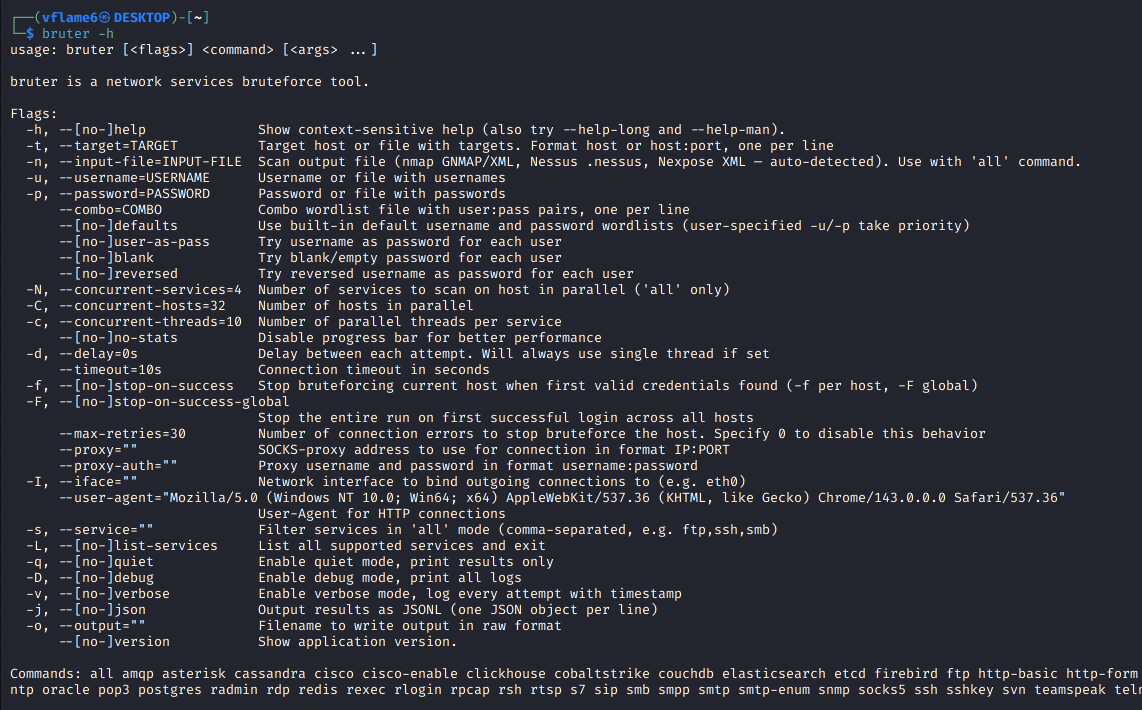
bruter covers everything you’d encounter on an internal network:
| Category | Modules |
|---|---|
| Remote Access | SSH, sshkey, RDP, WinRM, Telnet, VNC, rexec, rlogin, rsh, Radmin, VMware Auth |
| Databases | MySQL, MSSQL, PostgreSQL, Oracle, MongoDB, Redis, ClickHouse, Cassandra, Neo4j, etcd, InfluxDB, Firebird, Memcached, CouchDB, Elasticsearch |
| SMTP, SMTP-enum, IMAP, POP3, NNTP | |
| Directory | LDAP, LDAPS |
| File Sharing | FTP, SMB, SVN |
| Web | HTTP Basic Auth, HTTP Form, HTTP Proxy, HashiCorp Vault |
| Messaging | IRC, XMPP, SMPP, AMQP |
| Network | SOCKS5, SNMP, RTSP, RPCAP |
| VoIP | Asterisk, TeamSpeak, SIP |
| Cisco | cisco, cisco-enable |
| Industrial | S7 (Siemens S7comm) |
| Other | Cobalt Strike |
Quick start:
1
2
3
4
5
6
7
8
9
# Single target, password list
bruter ssh -t 192.168.1.10 -u root -p passwords.txt

# Built-in defaults (40+ usernames × 1000+ passwords)
bruter mysql -t 10.0.0.5 --defaults

# Through a SOCKS5 proxy

bruter smb -t 10.0.0.1 -u admin -p passwords.txt --proxy 127.0.0.1:1080
One command, one binary, done.
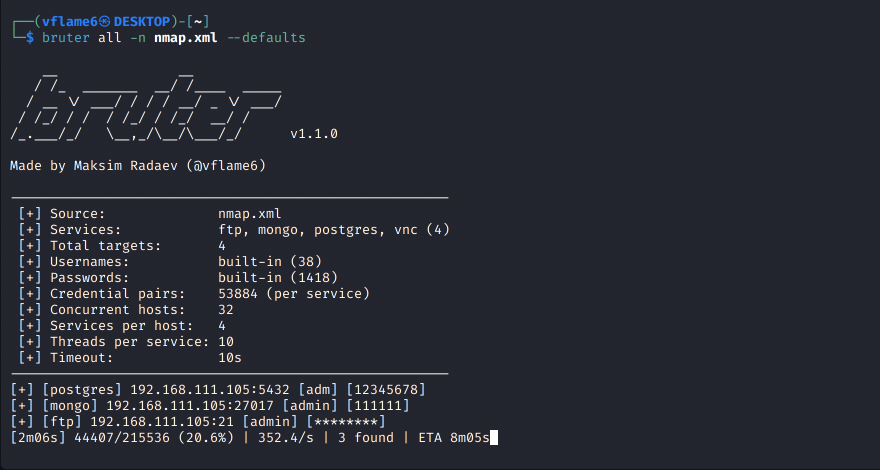
Live dashboard and progress
When bruter starts, it shows exactly what’s about to happen - services identified, target count, credential pairs, and threading config:
1
2
3
4
5
6
7
 [+] Services:            ftp, mysql, rdp, redis, smb, ssh (6)
 [+] Total targets:       12
 [+] Credential pairs:    431072
 [+] Concurrent hosts:    32
 [+] Threads per host:    10

[5s] 1200/431072 (0.3%) | 240.0/s | 0 found | ETA 29m51s
The live progress bar tracks attempts, speed, found credentials, and ETA across all targets. --no-stats disables it for cleaner output or piping.
Smart credential mutations
Sometimes you don’t need a wordlist at all. Three flags generate quick-win credential pairs from the username list:
--user-as-pass- triesadmin:admin,root:root, etc.--blank- tries empty passwords (admin:)--reversed- tries reversed usernames (admin:nimda)
These are tried before the main wordlist, so low-hanging fruit gets caught first:
1
bruter ssh -t targets.txt -u users.txt --user-as-pass --blank --reversed
They combine with regular wordlists too - --user-as-pass -p passwords.txt --defaults just prepends the mutation pairs.
Parallel execution
Three levels of concurrency, each independently configurable:
-C- concurrent hosts (default: 32)-c- threads per service per host (default: 5)-N- concurrent services per host inallmode (default: 4)
The -N flag is what makes large scans practical. Instead of bruting SSH, then RDP, then SMB sequentially on each host, bruter runs them simultaneously. On networks with dozens of services per host, this cuts total scan time significantly.
Service filtering and listing
When using all mode with a scan file, filter to specific services instead of bruting everything:
1
bruter all -n scan.gnmap --defaults -s ssh,ftp,rdp
List all 55 supported modules with their default ports:
1
bruter -L
Feed it your scan results
On a real engagement you don’t manually type targets. You have scan results. bruter eats them directly:
1
2
3
4
5
6
7
8
9
10
11
12
# nmap → bruter (GNMAP or XML, auto-detected)
nmap -sV -oG scan.gnmap 10.0.0.0/24
bruter all -n scan.gnmap --defaults

# Nessus → bruter
bruter all -n scan.nessus -u admin -p passwords.txt

# Nexpose → bruter
bruter all -n nexpose-report.xml --defaults

# fingerprintx/naabu pipeline via stdin
naabu -host 10.0.0.0/24 -silent | fingerprintx --json | bruter all --defaults
bruter auto-detects the format, maps discovered services to the right modules, and runs everything. Your workflow is: scan, feed, brute. No parsing scripts, no manual target lists.
Embedded SSH bad keys
bruter ships with 9 known-bad SSH private keys compiled directly into the binary - sourced from rapid7/ssh-badkeys. These are real keys that vendors shipped in production hardware:
- F5 BIG-IP (CVE-2012-1493) - factory root key
- ExaGrid (CVE-2016-1561) - backup appliance backdoor
- Ceragon FibeAir (CVE-2015-0936) - microwave radio link
- HashiCorp Vagrant - the infamous insecure key
- Barracuda, Array Networks, Monroe DASDEC, Quantum DXi, Loadbalancer.org
You’d be surprised how often these show up on internal networks. Vagrant boxes that never rotated their keys, appliances running factory firmware. One command tests all of them:
1
bruter sshkey --defaults -t targets.txt
Everything else
- Smart probing - auto-detects TLS and tests default credentials before the full run
- SOCKS5 proxy - with optional auth, for pivoting through compromised hosts
- Interface binding -
-I eth0to bind to a specific NIC - Comma-separated targets -
-t 10.0.0.1,10.0.0.2works directly - Stop-on-success - per-host (
-f) or global (-F) - JSONL output -
-jfor machine-readable results, pipe tojq - Combo wordlists - pre-paired
user:passfiles with--combo - Default merging -
-u users.txt -p passwords.txt --defaultscombines your lists with built-in defaults - Auto SSH key expansion - in
allmode with--defaults, SSH targets automatically get tested with embedded bad keys alongside password brute - Delay mode -
-d 500msto throttle attempts for stealthier scans (forces single thread)
Write your own bruter module
Here’s the part I’m most proud of. bruter isn’t just a tool - it’s a framework. The module interface is designed so that adding a new protocol is trivial.
The problem of one-off brute-force scripts
Let’s say you’re on an engagement and you encounter a service that your tools don’t support. What do you do?
Option 1: write a bash script. Find the service’s CLI client, wrap it in a while read loop. It works, but you get no parallelism, no progress bar, no proxy support, no timeout handling. Exactly what I did with ClickHouse that first time.
Option 2: search for existing tools. Maybe someone on GitHub built a standalone brute-forcer for your specific protocol. Maybe not. And if they did, it’s probably another one-off script with its own CLI interface, its own wordlist format, and its own quirks.
Option 3: write your own tool from scratch. Connection handling, threading, wordlist parsing, output formatting, signal handling, retry logic, TLS detection… You end up spending more time on infrastructure than on the actual authentication check.
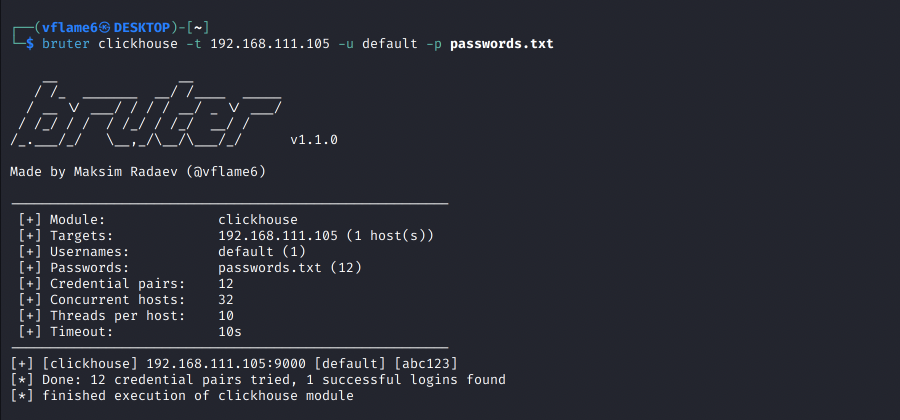
Option 4: write a bruter module. You implement one function - the authentication check. bruter handles everything else.
The module interface
Every module in bruter implements a single function:
1
2
3
4
5
6
7
type ModuleHandler func(
	ctx context.Context,
	dialer *utils.ProxyAwareDialer,
	timeout time.Duration,
	target *Target,
	cred *Credential,
) (bool, error)
You get:
ctx- for cancellation (Ctrl+C, timeouts)dialer- handles SOCKS5 proxy, TLS, and interface binding transparentlytimeout- connection timeout from the CLI flagstarget- IP, port, and TLS flag (already probed by bruter)cred- username and password to test
You return:
(true, nil)- auth succeeded(false, nil)- wrong credentials, keep trying(false, err)- connection error, triggers retry
That’s it. bruter handles target parsing, wordlist loading, parallelism, progress display, output formatting, TLS fallback, retry logic, and result collection. You just write the authentication check.
Example: the ClickHouse module
Remember the problem that started this whole project? Here’s how it’s solved in bruter:
1
2
3
4
5
6
7
8
9
10
11
12
13
14
15
16
17
18
19
20
21
22
23
24
25
26
27
28
29
30
31
32
33
34
35
36
37
func ClickHouseHandler(ctx context.Context, dialer *utils.ProxyAwareDialer,
	timeout time.Duration, target *Target, credential *Credential) (bool, error) {
	opts := &clickhouse.Options{
		Addr: []string{target.Addr()},
		Auth: clickhouse.Auth{
			Database: "default",
			Username: credential.Username,
			Password: credential.Password,
		},

		DialTimeout: timeout,
		DialContext: func(ctx context.Context, addr string) (net.Conn, error) {
			return dialer.DialContext(ctx, "tcp", addr)
		},
	}

	if target.Encryption {
		opts.TLS = utils.GetTLSConfig()
	}

	conn, err := clickhouse.Open(opts)
	if err != nil {
		return false, err
	}
	defer conn.Close()

	err = conn.Ping(ctx)

	if err != nil {
	if isClickHouseAuthError(err) {
		return false, nil // wrong creds
	}
		return false, err // connection error
	}

	return true, nil
}
The pattern is always the same: connect, authenticate, report. The Go library handles the protocol complexity. Your module handles the glue.
The only tricky part is classifying errors - distinguishing “wrong password” from “server unreachable.” Most Go libraries make this straightforward with typed errors or error codes.
Step-by-step: adding a new module
Say you encounter a service bruter doesn’t support yet. Here’s the full process:
Step 1. Find a Go library for your protocol on pkg.go.dev or GitHub. Most common services have pure-Go implementations.
If no protocol implementations are available online - research the protocol and try to implement it by yourself. Should be a doable task in AI era. You can feed the LLM with RFC and open source project examples to make it understand the thing. Then, make it implement the protocol.
Step 2. Create scanner/modules/yourprotocol.go and implement the ModuleHandler function. Follow the pattern: connect, authenticate, classify the error, return the result.
Step 3. Register it in scanner/modules/modules.go:
1
2
3
4
var Modules = map[string]Module{
	// ...existing modules...
	"yourprotocol": {DefaultPort, YourProtocolHandler, "defaultuser", "defaultpass"},
}
Step 4. Add the CLI command in main.go:
1
yourProtocolCmd = app.Command("yourprotocol", "Your Protocol brute-force (port XXXX)")
Step 5. Add the nmap service mapping in parser/parser.go so scan file auto-detection picks it up:
1
2
3
var serviceMap = map[string]string{
	"yourprotocol": "yourprotocol",
}
Build, test, done. Your new module immediately gets parallel execution, SOCKS5 proxy support, TLS probing, live progress, JSONL output, combo wordlists, scan file integration, and host-level concurrent services (-N). The full feature set, for free.
Install
One command:
1
go install -v github.com/vflame6/bruter@latest
Or grab a binary from Releases.
Build from source:
1
2
3
git clone https://github.com/vflame6/bruter.git
cd bruter
go build -o bruter main.go
Build with Docker:
1
2
docker build -t bruter .
docker run --rm bruter ssh -t 10.0.0.1 -u admin -p passwords.txt
Conclusion
Checkout the bruter project on GitHub: github.com/vflame6/bruter
Found a protocol that needs a module? Open an issue or submit a PR - the interface makes it straightforward.
Contributions are welcome! New module ideas, bug reports, and feature requests are all appreciated.