Introducing leaker - Passive Leak Enumeration Tool
Introducing a new tool to find and enumerate public leaks via passive sources.
Introduction
Hi! Today I want to share my new tool - leaker. It is a leak discovery tool that returns valid credential leaks for emails, using passive online sources. In this blog post I will show its installation, functionality and discuss some ways to improve it in the future.
leaker is already available on my GitHub - https://github.com/vflame6/leaker.
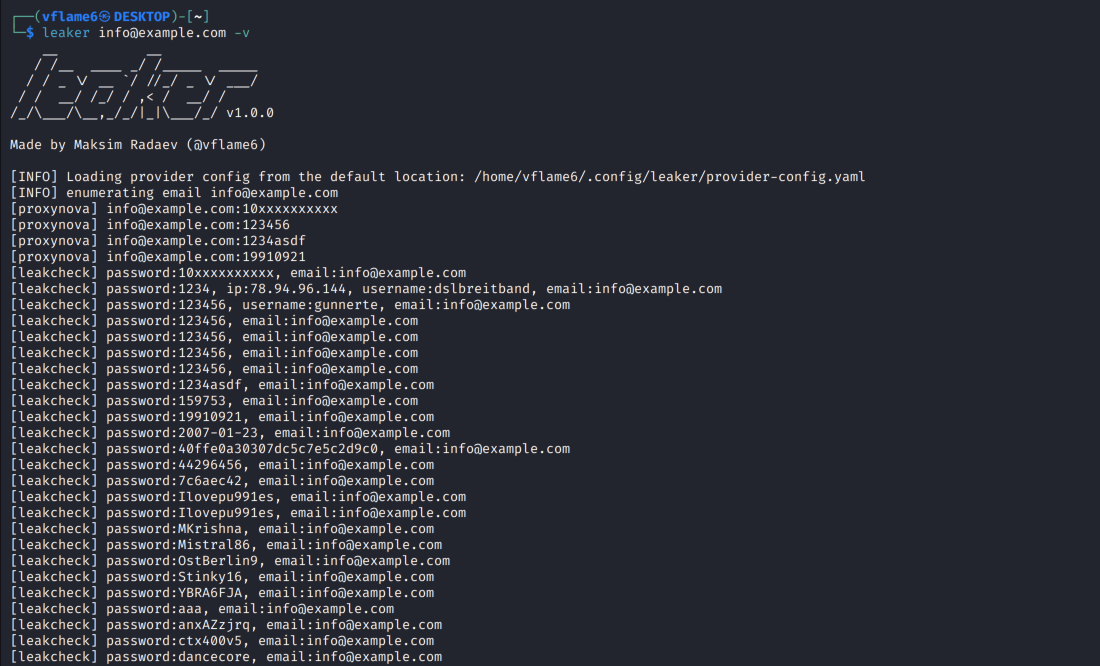
subfinder, but for leaks
A main idea for the tool came from subfinder tool, which is used to enumerate subdomains over passive sources, a.k.a. external attack surface management systems. I use it on a regular basis and it helps automate my work in external network penetration testing projects.
I wanted to automate another attack vector in such type of projects - publicly available leaks. There a a few projects that provide options to view leaked data based on email or domain, like ProxyNova. Much less, than for subdomains, but I think they will become more popular and we will have more such sources of information.
Main targets to focus were sources with an ability to disclose the leaked information. There are some sources without an option to view the leaked data, like Have I Been Pwned, they were out of scope for the tool. API access was preferred too. So, available sources for the time of writing: proxynova, leakcheck.
There are not many of them, but they are already yielding results. I tried the tool on few of my emails and got some leaked password for my accounts. So I think the tool is already useful for basic leakage checks on the projects.
Installation
leaker requires go1.25 to install successfully.
1
go install -v github.com/vflame6/leaker@latest
Compiled versions are available on Release Binaries page.
You can download and build the tool from source code. To Build:
1
2
3
4
git clone https://github.com/vflame6/leaker.git
cd leaker
go build -o leaker main.go
./leaker --version
Configure API keys
leaker can be used right after the installation, however many sources required API keys to work. View an example configuration file here: https://github.com/vflame6/leaker/blob/main/static/provider-config.yml.
The tool will generate a provider configuration file on the first launch, so you can also specify API keys there.
The example configuration file for the time of writing this is done like that:
1
2
leakcheck:
  - 0123456789abcdef0123456789abcdef01234567
After setting up the API keys, the tool will handle them automatically. If the API keys are not specified, leaker will automatically skip sources which require them to work.
Usage
1
leaker -h
Here is a help menu for the tool:
1
2
3
4
5
6
7
8
9
10
11
12
13
14
15
16
17
18
19
20
21
22
Usage: leaker [<targets>] [flags]

  leaker is a leak discovery tool that returns valid credential leaks for emails, using passive online sources.

Arguments:
  [<targets>]    Target email or file with emails

Flags:
  -h, --help                                     Show context-sensitive help.
  -s, --sources=all,...                          Specific sources to use for enumeration (default all). Use --list-sources to display all available sources.
  --timeout=10s                              Seconds to wait before timing out (default 10s)
  -N, --no-rate-limit                            Disable rate limiting (DANGER)
  -o, --output=STRING                            File to write output to
  --overwrite                                Force overwrite of existing output file
  -p, --provider-config="provider-config.yml"    Provider config file
  --proxy=STRING                             HTTP proxy to use with leaker
  -A, --user-agent=STRING                        Custom user agent
  --version                                  Print version of leaker
  -q, --quiet                                    Suppress output, print results only
  -v, --verbose                                  Show sources in results output
  -D, --debug                                    Enable debug mode
  --list-sources                             List all available sources
It is worth noting that leaker does not filter any of the received result. I mean if the leak contains more data than just username and password, like it is done in LeakCheck, leaker will output everything it got from the source. But, the tool will filter unrelevant and inappropriate data, for example results which do not match the entered search query. It is done like that in ProxyNova source, because they can give a result based on domain rather than target email. Such behavior is cool, but when you try to enter something like username@gmail.com, it can become a real mess.
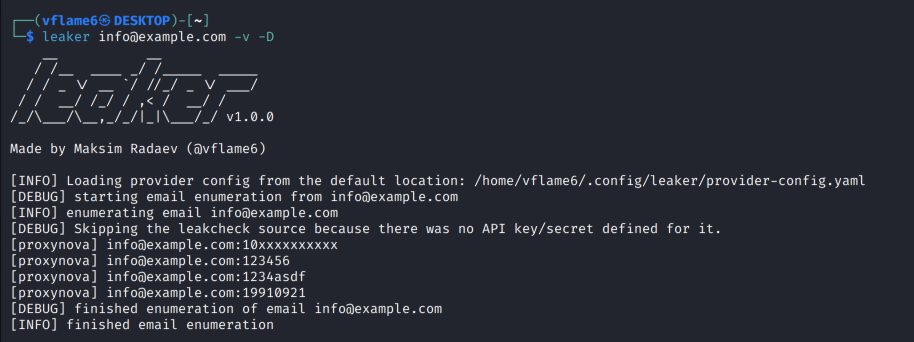
Run without pre-configured API keys
leaker can be used right after the installation. If the API keys are not specified, the tool will automatically skip sources that requires them and provide available results.
At the time of the writing the only source without any authenticated access is ProxyNova.
1
leaker info@example.com -v -D
Run with pre-configured API keys
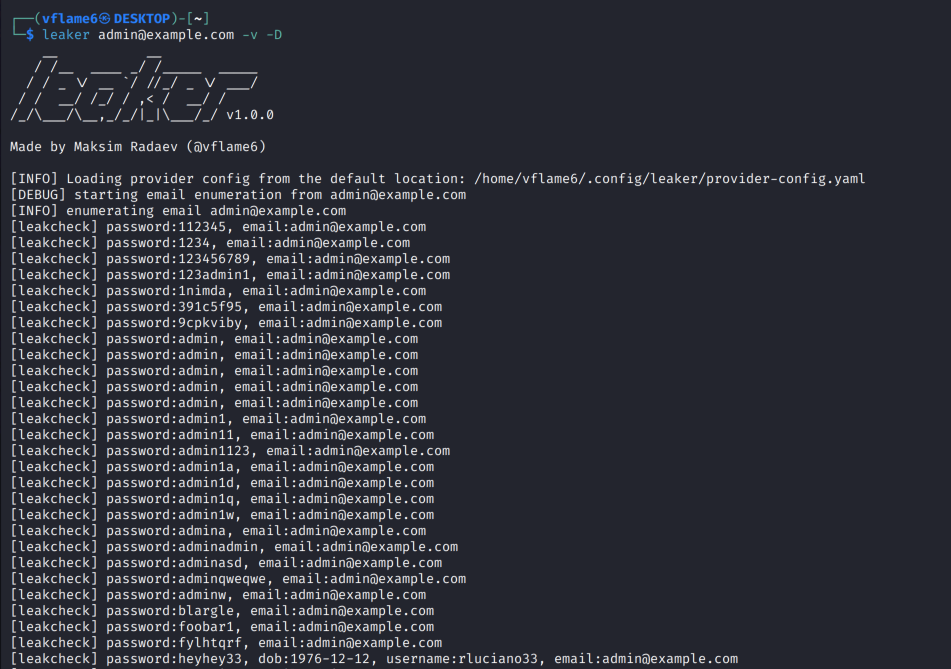
If the API keys are specified, the tool will handle configured API keys automatically and execute the enumeration from specified sources.
At the time of the writing the only source with authenticated API access is LeakCheck.
Note: LeakCheck disabled searching for emails under
.govdomains. It will return an error if you try to do that.
1
leaker admin@example.com -v -D
Further actions and development
There is a lot of opportunities to expand the tool’s functionality and unlock its full potential. The main problem for now is lack of available sources for that task. If you know some sources with public or paid APIs (or parseable frontend 😁), please share it with me - I will add it to the tool.
Also, I think it will force available source maintainers to improve their services. For example, they could add more leaked data into their databases. I think the community is not yet developed for such services.
I would be very grateful for new ideas and identified bugs in the tool. You can leave them on the Issues page on GitHub. It would be a great contribution.
How to add a new source in leaker
The code is easy to maintain, thanks to projectdiscovery team and especially their open-source work on GitHub, I took a lot of code examples from their libraries and modified some things to make the code right to me and do its job.
To add a new source to the tool, you need to develop a new struct and implement the Source interface. The interface is defined here - https://github.com/vflame6/leaker/blob/main/runner/sources/types.go.
You can use available sources as an examples for your module:
ProxyNovais an example of free API, which does not require API key to work - https://github.com/vflame6/leaker/blob/main/runner/sources/proxynova.goLeakCheckis an example of paid API, which requires API key to work - https://github.com/vflame6/leaker/blob/main/runner/sources/leakcheck.go
After the module is ready to use, add it to the list of all modules and the tool will handle everything automatically. The AllSources variable, which is responsible for that, can be found here - https://github.com/vflame6/leaker/blob/main/runner/sources.go.
Conclusion
In this post I’ve presented a new tool to enumerate leaks, its functionality and plans to improve it. You can find the tool on my GitHub - https://github.com/vflame6/leaker.
Thank you for reading, I hope it was useful for you ❤️