.DS_Store. Mapping Web Server Directories Through macOS System Files
How a hidden macOS Finder file leaks the full directory tree of a web application, what is inside the format, and a tool to walk it recursively.
Introduction
You have probably seen this file before. Plug in a USB drive that a colleague on macOS handed you, enable hidden files, and there it is in every single folder: .DS_Store. Apple’s operating system creates it to remember how a directory should be displayed — icon positions, view mode, window size, sort order, background. The closest equivalents in Windows are desktop.ini and Thumbs.db.
The interesting part is what else it remembers. To track per-item display state, Finder has to store a record for every item in the directory. That means the file carries the names of the files and subdirectories it sits next to.
Now imagine a developer who builds a site on a MacBook and deploys it “as is” — drag the project folder into an SFTP client, rsync -a the working directory, COPY . . in a Dockerfile, commit everything without a .gitignore. The .DS_Store files ride along. From that moment the web server hands out a directory listing to anyone who asks for it, even with autoindex off, even for files that are not linked from anywhere.
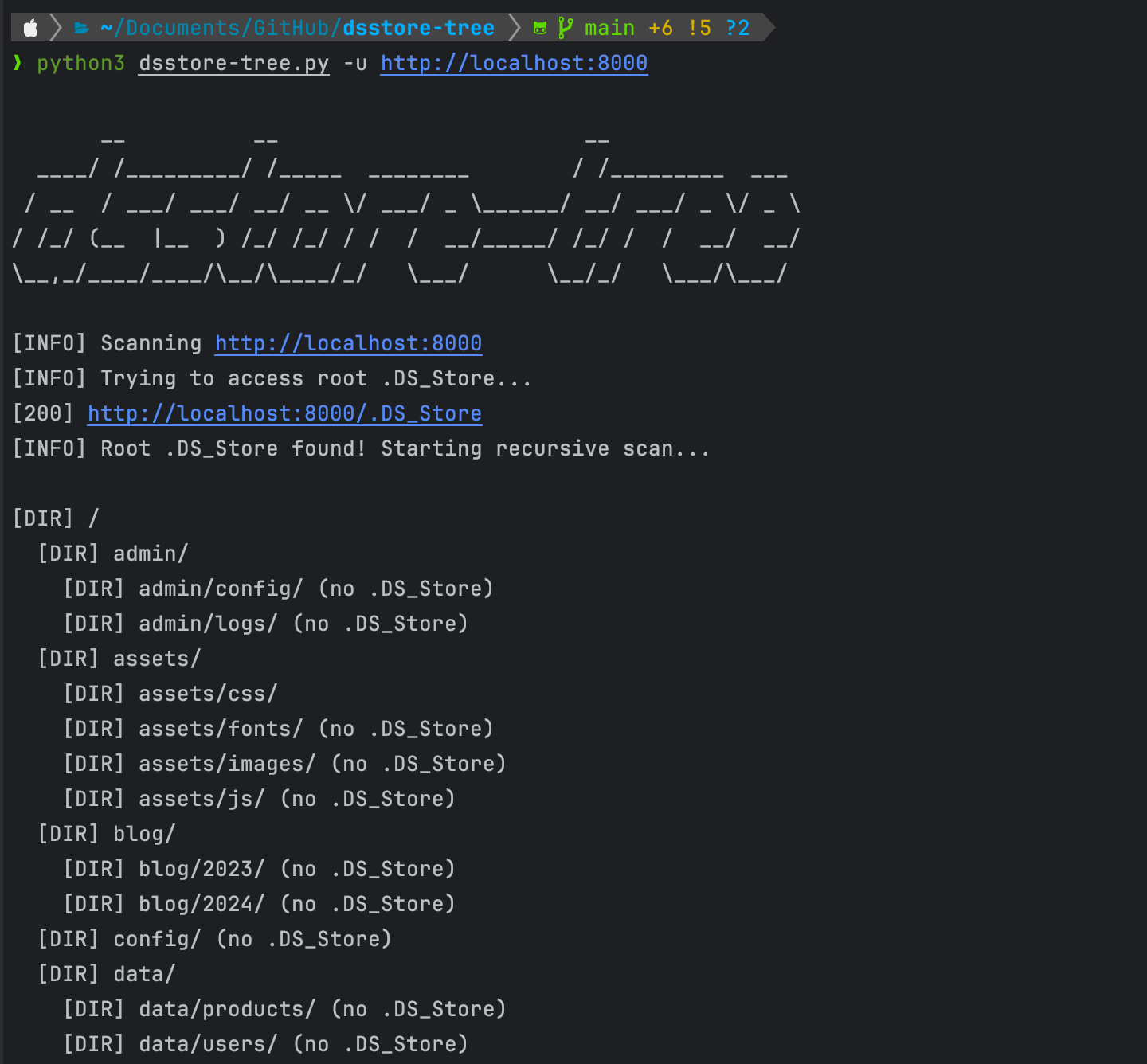
TL;DR — I wrote a tool that walks those files recursively and rebuilds the directory tree of a target web server: github.com/vflame6/dsstore-tree.
After looking into this, I went and cleaned
.DS_Storeoff a couple of my own web applications 😅
Why this beats directory brute force
Content discovery normally means throwing a wordlist at the target and watching status codes. That approach has a hard ceiling: you only find what someone already put in a wordlist.
.DS_Store inverts it. The server tells you the real names:
- No guessing.
backup_2024_final.sqlordb_dump_prod.tgzwill never be inraft-large-files.txt. It will be in.DS_Store. - Almost no noise. One request per directory instead of tens of thousands. Nothing in the WAF logs looks like an attack.
- Names of things that are not served. The record exists because the file existed in the folder on the developer’s Mac. Finder does not aggressively prune records either, so entries can outlive the files themselves — a
404today still tells you what used to be there and what naming convention the team uses. - It recurses. Each subdirectory usually has its own
.DS_Store. Follow them and you get the whole tree, not one level.
What tends to fall out of that tree on a real engagement: .sql and .db dumps, .tgz / .zip archives of the document root, .swp and .bak leftovers from an editor, config.old, .env copies, private keys, and admin paths that were “hidden” by simply not linking them.
This is not theoretical. A .DS_Store file on a public Microsoft Vancouver web server exposed the site root and WordPress credentials. Back in 2015 the same class of exposure was used to reach an admin portal of TCL. Search engines index these files, so a chunk of the exposure is findable without touching the target at all, and scanners have caught up — Tenable WAS ships plugin 98646 for exactly this, and OWASP ZAP added .DS_Store parsing in 2023.
What is actually inside the file
The format is undocumented by Apple and was reverse engineered by the community — the reference write-up is Sebastian Neef’s Parsing the .DS_Store file format. Short version, because it explains the failure modes of any parser you use:
Everything is big-endian. The file opens with a 36-byte header: a 4-byte alignment value of 0x01, then the magic 0x42756431 — ASCII Bud1 — then the offset and size of the root block (typically 0x1000 and 0x800).
Bud1 is a buddy allocator. Block addresses are packed: the five least significant bits hold k, where the block size is 2^k; zeroing those bits gives the offset. The root block holds three sections — the offset table, a table of contents with at least one entry named DSDB pointing at the first traversable block, and a free list of 32 buckets.
The data itself is a B-tree. Each block starts with a mode: 0x00 means the records follow directly, anything else means it is an internal node and you recurse into its children.
A record is:
1
2
3
4
5
[4 bytes]  filename length (in UTF-16 code units)
[N bytes]  filename, UTF-16 big-endian
[4 bytes]  structure ID   e.g. Iloc, bwsp, dscl, lsvo, vSrn
[4 bytes]  structure type e.g. blob, long, bool, type, ustr
[variable] data, length depends on the type
The structure IDs are the display metadata — Iloc is an icon’s coordinates, bwsp is a serialized plist of browser window settings, dscl is whether a folder was expanded in list view. None of that matters to an attacker. The filename field in front of them is the whole payload. One directory produces many records per item, so a parser’s job is mostly deduplication.
Two practical consequences:
- A name in the tree is a claim, not a guarantee. You still have to probe it.
- Truncated or partially downloaded files parse badly. If a target returns a
200with an HTML error page, a naive parser will happily produce garbage — worth checking the magic bytes yourself when results look strange.
dsstore-tree
There are existing parsers — gehaxelt/Python-dsstore for the format, lijiejie/ds_store_exp for the recursive download. I wanted something I could point at a target during an engagement and get a clean tree, JSON for the report, and traffic that goes through Burp when I need to see it.
Install
1
pipx install git+https://github.com/vflame6/dsstore-tree.git
Or manually:
1
2
3
git clone https://github.com/vflame6/dsstore-tree.git
cd dsstore-tree
pip3 install -r requirements.txt
Run it
1
dsstore-tree -u https://example.com
That is the whole basic workflow. The tool fetches /.DS_Store, parses it, probes every name it found, and walks down into every subdirectory that has its own .DS_Store.
Options
1
2
3
4
5
6
7
8
9
10
11
-u, --url URL       Base URL to scan (required)
-d, --download      Download and mirror discovered files
-q, --quiet         Suppress informational output
-j, --json          Output results as JSON
-o, --output FILE   Write JSON results to file
-H, --header K:V    Custom header (repeatable)
--proxy URL         HTTP/SOCKS proxy (e.g., http://127.0.0.1:8080)
--threads N         Concurrent requests (default: 10)
--timeout SEC       HTTP timeout in seconds (default: 10)
--depth N           Max recursion depth (0 = unlimited)
--no-color          Disable colored output
Examples
Through Burp, so every request is in the proxy history:
1
dsstore-tree -u https://target.com --proxy http://127.0.0.1:8080
Mirror everything it finds and keep a JSON report for the write-up:
1
dsstore-tree -u https://target.com -d -o report.json
Behind authentication:
1
dsstore-tree -u https://target.com -H "Cookie: session=abc123"
Pipe the file list straight into the next step:
1
dsstore-tree -u https://target.com -j | jq '.files[].path'
With -d, files are written into dsstore-tree_<host>/ with the remote directory structure preserved, so you end up with a local copy of whatever part of the document root was reachable.
How the walk works
The parsing is the easy half. The interesting half is turning a flat list of names into a tree, because .DS_Store does not say which entries are directories — it stores files and folders the same way.
For every name, the tool asks the server three questions, in order:
GET <name>/.DS_Store— a200with a non-empty body means it is a directory and it leaks its own contents. Queue it for recursion.HEAD <name>with redirects disabled — a301/302means a directory without a.DS_Store(servers redirect to add the trailing slash). Record it, but there is nothing to descend into.HEAD <name>returning200— a file. Record it, download it if-dis set.
Anything else is dropped. The probes for one directory run in a thread pool (--threads, default 10), so the cost of a level is roughly one round trip rather than one per entry.
A few details that matter in practice:
- Loop protection. Visited paths go into a
scanned_dirsset. Symlinked or self-referencing layouts do not send the scan into an infinite descent. - Path traversal guard. Names containing
..or starting with/are rejected before they are ever joined into a URL. A malicious.DS_Storeshould not be able to make the downloader write outside its own output directory. - Depth control.
--depth Ncaps recursion on deep trees, which matters on something like anode_modulesfolder that got deployed by accident. - TLS verification is off and warnings are suppressed, because on internal engagements the certificate is usually wrong and that is not the finding you are there for.
Fixing it
If you are on the other side of this, it is cheap to close.
Stop shipping the files. Add .DS_Store to the repository’s .gitignore, and to a global one so you never think about it again:
1
2
git config --global core.excludesfile ~/.gitignore_global
echo ".DS_Store" >> ~/.gitignore_global
Clean what is already committed:
1
2
find . -name ".DS_Store" -print -delete
git rm --cached '*.DS_Store' -r
Block dotfiles at the web server, which also covers .git, .env and friends.
nginx:
1
2
3
location ~ /\. {
  deny all;
}
Apache:
1
2
3
<FilesMatch "^\.">
  Require all denied
</FilesMatch>
Deploy build artifacts, not working directories. rsync -a --exclude='.DS_Store' or a proper build step removes the whole class of problem, along with .git, editor swap files and local .env copies.
Reduce creation at the source. On macOS this stops Finder writing them to network shares:
1
defaults write com.apple.desktopservices DSDontWriteNetworkStores -bool true
It does not affect local disks, so it is a partial measure — the deploy-time exclusion is the real fix.
Conclusion
.DS_Store is a display-preferences file that happens to double as a directory listing, and it survives every mitigation aimed at directory listings because the web server sees nothing but an ordinary static asset. One request, no wordlist, real file names.
The tool is on GitHub: github.com/vflame6/dsstore-tree. Issues and PRs welcome.
And it is worth running once against your own infrastructure before someone else does.